The KNEC CBA Portal is an online platform provided by the Kenya National Examinations Council (KNEC) to support schools and authorized users in accessing Competency Based Assessment services. The portal provides access to CBA-related activities and information through registered school or centre accounts. Authorized users can log in to the portal using the credentials associated with their school or assessment centre account.
This guide explains how to log in to the KNEC CBA Portal online using the official KNEC CBA website. The login process involves visiting the KNEC CBA Portal, opening the sign-in page, entering your registered Email or Centre Code and Password, and submitting the login details for verification. Once the credentials are accepted, you can successfully access your KNEC CBA Portal account and the available CBA services.
READ ALSO: How To Log In To KNEC E-Certificate Platform
What is KNEC CBA Portal?
The KNEC CBA Portal is an online platform provided by the Kenya National Examinations Council (KNEC) for accessing and managing services related to Competency Based Assessment (CBA). The portal is used by schools and authorized users to access CBA assessment services, information, and activities associated with learners and their respective institutions.
The KNEC CBA Portal provides a centralized online platform where authorized school users can access their registered accounts and carry out available CBA-related activities. Access to the portal is provided through the official KNEC CBA website, where users can sign in using their registered Email or Centre Code and Password.
What is KNEC CBA Portal Login?
KNEC CBA Portal Login refers to the process of accessing a registered KNEC Competency Based Assessment account through the official KNEC CBA Portal. The login process allows authorized school users to verify their account credentials and gain access to the CBA services, assessment information, and other activities available through the portal.
The KNEC CBA Portal Login is completed online using the registered Email or Centre Code and Password associated with the school or assessment centre account. After entering the required login details and submitting them for verification, an authorized user can access their KNEC CBA Portal account and continue with the available CBA-related services.
Requirements Needed To Log In To KNEC CBA Portal
To log in to the KNEC CBA Portal, you need the login credentials associated with your registered school or assessment centre account. These details are required to identify your account and verify that you are an authorized user before access to the portal is granted. You should have your registered Email or Centre Code and Password ready before starting the login process. The requirements needed to log in to KNEC CBA Portal are:
- Registered Email or Centre Code
- KNEC CBA Portal Password
Once you have your registered Email or Centre Code and KNEC CBA Portal Password ready, you can proceed to access your account online. The process involves visiting the official KNEC CBA Portal, entering your Email or Centre Code and Password, and submitting the login details for verification.
How To Log In To KNEC CBA Portal
With your registered Email or Centre Code and KNEC CBA Portal Password ready, you can begin the process of accessing your KNEC CBA Portal account. The login process involves visiting the official KNEC CBA Portal, entering your registered login details, and submitting the information for verification before accessing the available CBA services. Follow the steps below to log in to KNEC CBA Portal:
- Step 1: Visit KNEC CBA Portal
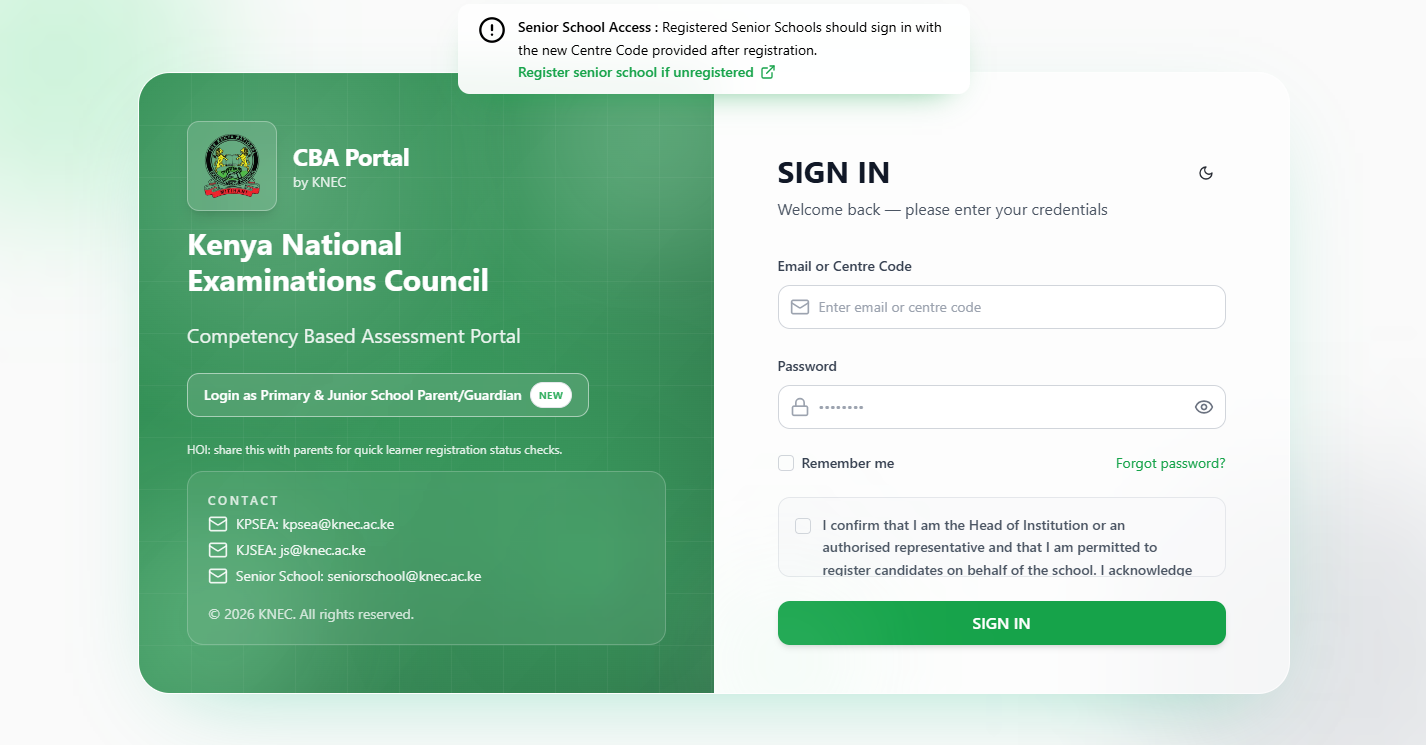
The first step in the process of KNEC CBA Portal Login is to visit the CBA Portal using https://cba.knec.ac.ke
- Step 2: Enter Email or Centre Code
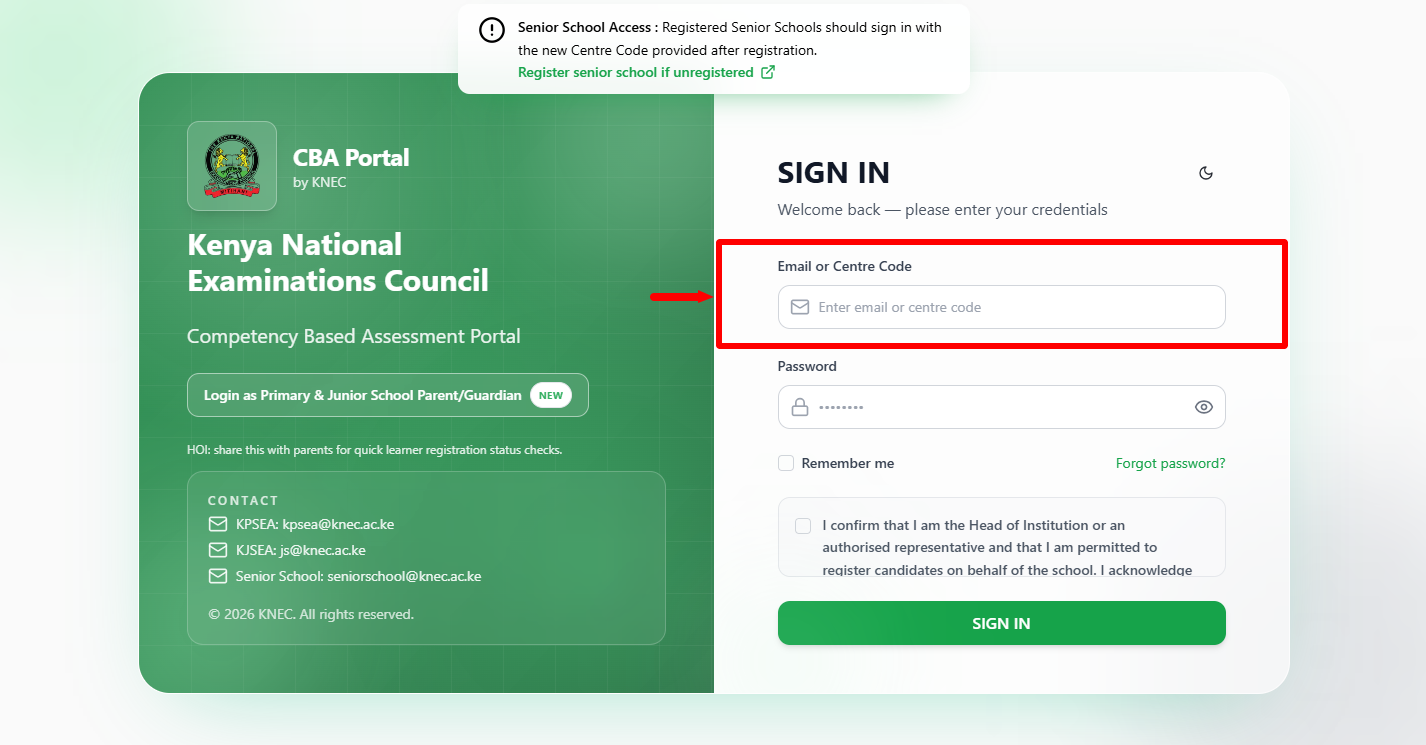
Once you are on KNEC CBA Portal, proceed and enter your CBA Portal login details i.e. enter “Email” or “Centre Code” associated with your CBA Portal account.
- Step 3: Enter KNEC CBA Portal Password
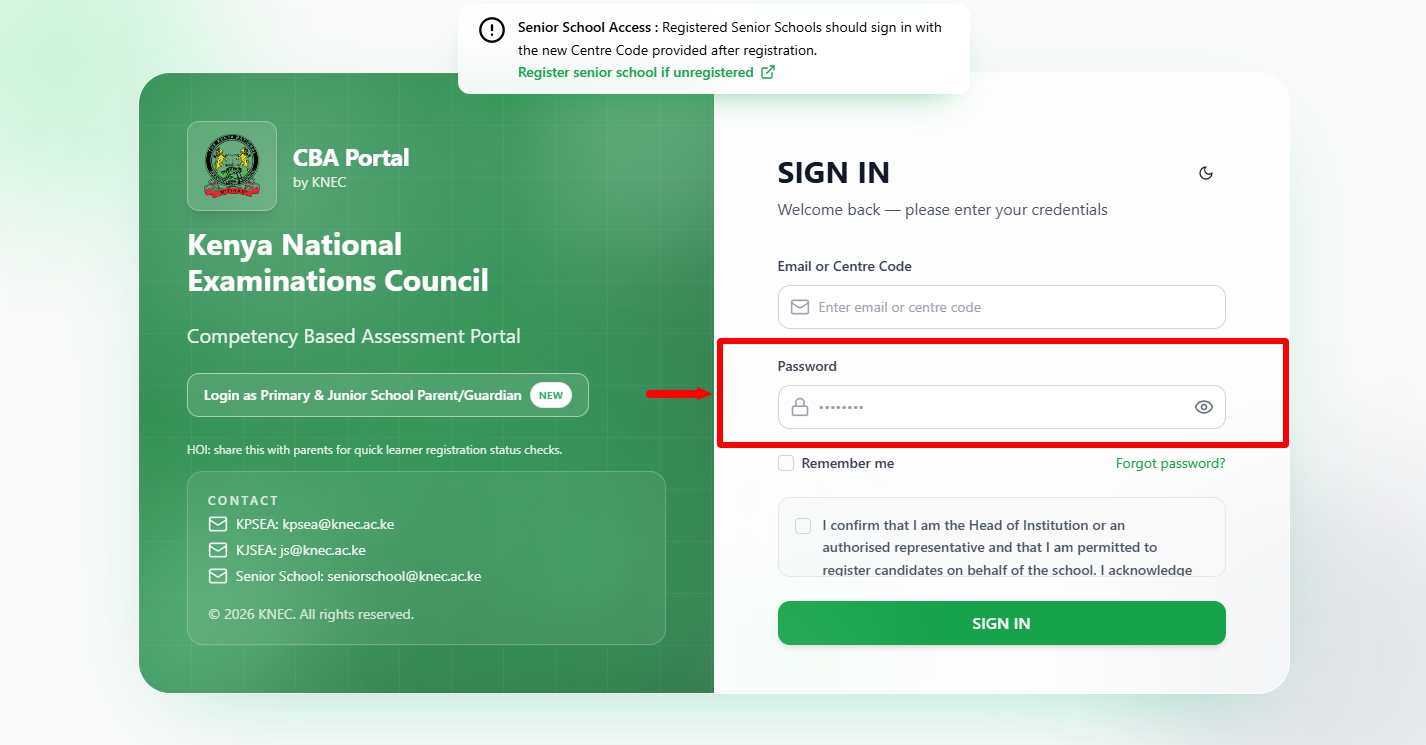
Next, proceed and enter your “KNEC CBA Portal Password” before moving to the next step, if you have forgotten your CBA Portal Password, you can easily reset the same online so as to be able to access your CBA Portal account once again.
- Step 4: Confirmation and Acknowledgment
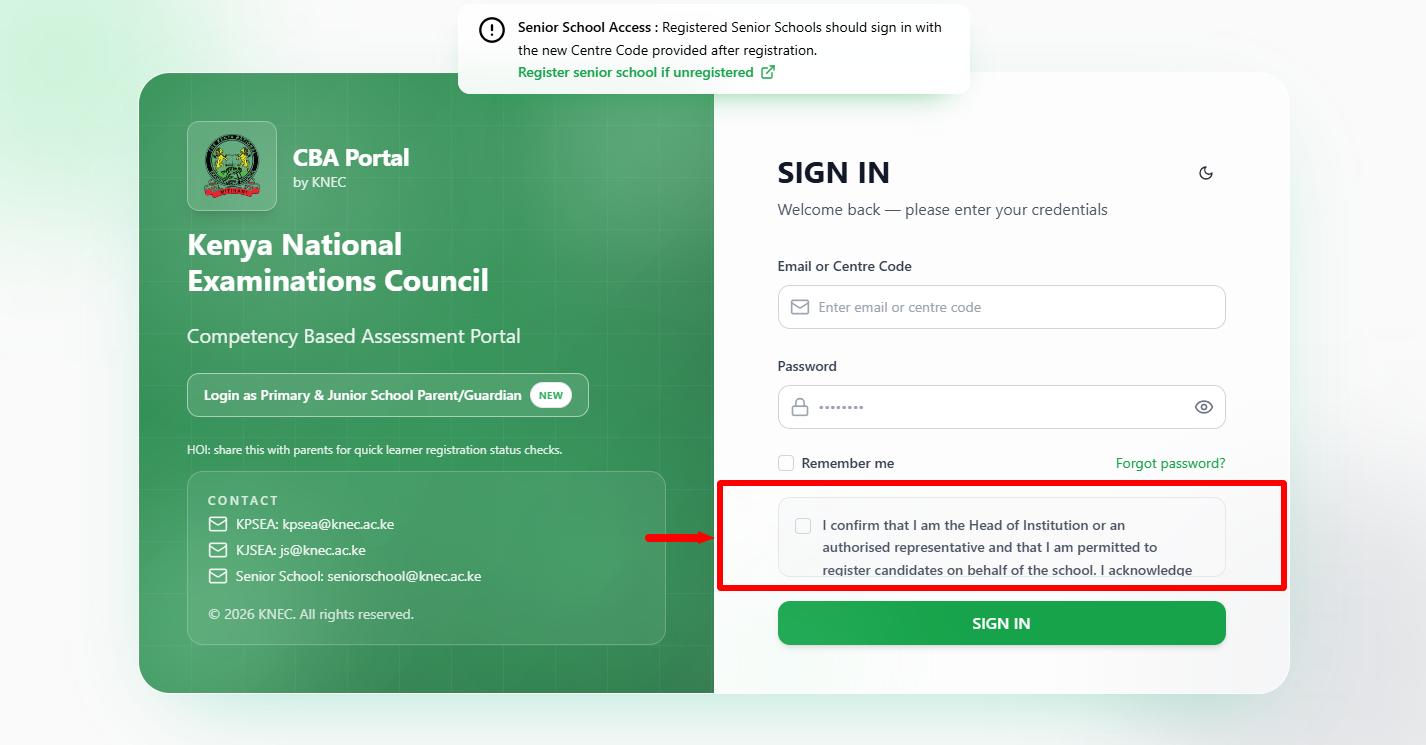
In this step, you need to tick on the checkbox confirmation and acknowledgement i.e. “I confirm that I am the Head of Institution or an authorised representative and that I am permitted to register candidates on behalf of the school. I acknowledge that the personal data of learners, including minors, will be collected and processed solely for the administration of assessments in accordance with the Kenya Data Protection Act, 2019, and will be kept private, confidential, and secure.” Once you have agreed to the above, proceed to the next step.
- Step 5: Click on Sign In
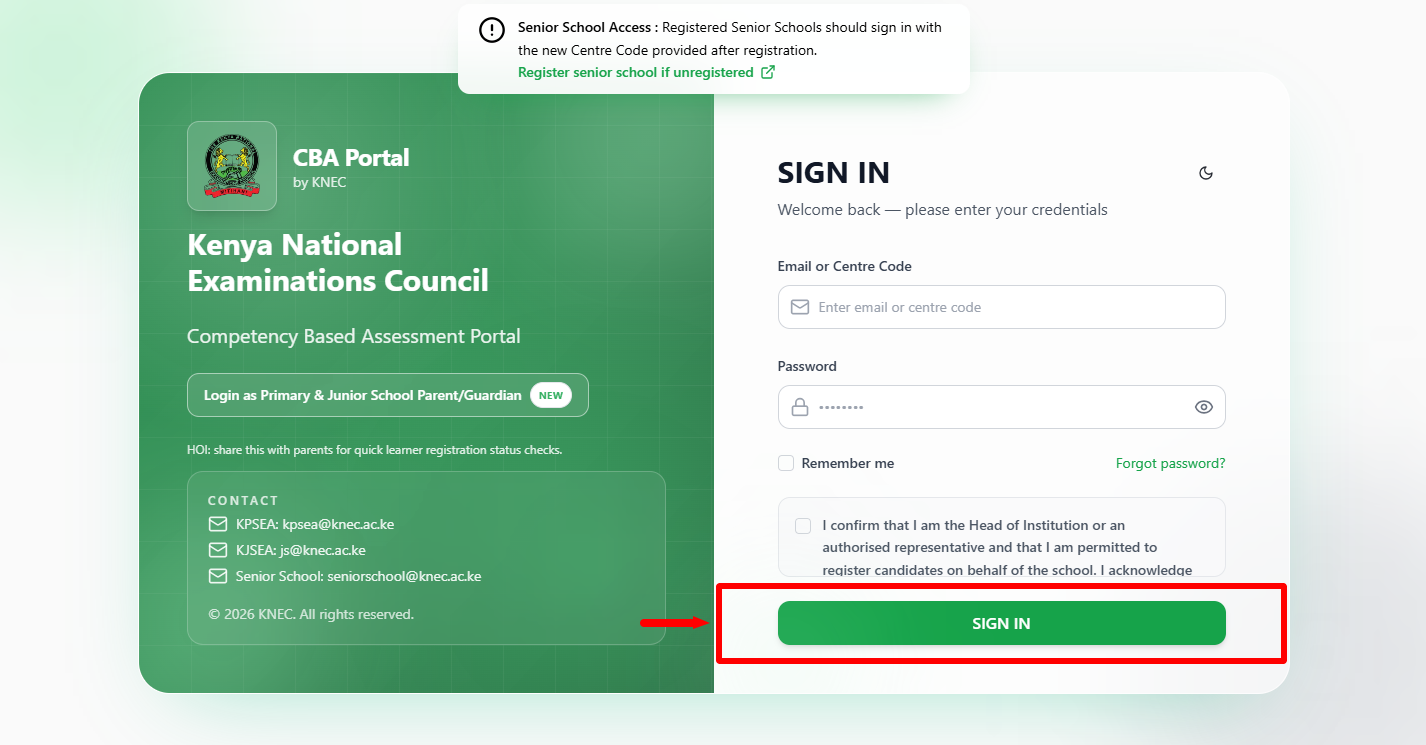
Lastly, once you have entered the correct CBA Portal login credentials i.e. Email or Centre Code, CBA Portal Password and have checked the checkbox fro Confirmation and Acknowledgement, proceed and click on the “Sign In” button to access your CBA Portal account. Your login credentials will be validated by the system and you will gain access to your KNEC CBA Portal account dashboard.
Frequently Asked Questions About KNEC CBA Portal Login
- 1. How To Log In To KNEC CBA Portal?
To Log In To KNEC CBA Portal, visit the official KNEC CBA Portal and enter your registered Email or Centre Code and Password. Complete the required confirmation and acknowledgment, then click Sign In to access your account.
- 2. What do I need to log in to KNEC CBA Portal?
You need your registered Email or Centre Code and KNEC CBA Portal Password to access the portal. You must also complete the required confirmation and acknowledgment before clicking Sign In.
- 3. Can I use my Centre Code to log in to KNEC CBA Portal?
Yes. The Centre Code can be entered in the Email or Centre Code field on the KNEC CBA Portal login page. Enter your password, complete the required acknowledgment, and click Sign In to submit your login details.
- 4. What is required before clicking Sign In on KNEC CBA Portal?
Before clicking Sign In, you need to enter your Email or Centre Code and Password and complete the confirmation and acknowledgment. You are required to confirm that you are the Head of Institution or an authorised representative permitted to register candidates on behalf of the school.
- 5. What happens after I log in to KNEC CBA Portal?
After your login details are successfully verified, you will be logged in to your KNEC CBA Portal account dashboard. You can then access the available CBA services and activities associated with your account.
- 6. Who can log in to KNEC CBA Portal?
The KNEC CBA Portal is intended for authorized school users who have valid account credentials. The login acknowledgment requires the user to confirm that they are the Head of Institution or an authorised representative permitted to register candidates on behalf of the school.
Overview: KNEC CBA Portal Login
To begin, visit the official KNEC CBA Portal and enter your registered Email or Centre Code and KNEC CBA Portal Password. Review the confirmation and acknowledgment statement, then confirm that you are the Head of Institution or an authorised representative permitted to register candidates on behalf of the school and that learner data will be handled securely in accordance with the Kenya Data Protection Act, 2019.
READ ALSO: How To Register on KNEC E-Certificate Platform
After completing the required confirmation and acknowledgment, click Sign In to submit your login details. If the credentials are correct, you will be logged in successfully to your KNEC CBA Portal account dashboard, where you can access the available CBA services and activities.