
If you have applied for a HELB loan and want to know the batch in which your application has been placed, you can check your loan details through the available HELB online services. The batch number can help you identify how your application has been grouped during the loan processing and disbursement process.
This guide explains where to find your HELB loan batch number and the steps to follow when checking your application details online. We also cover what information to look for once you access your loan records, making it easier to confirm the batch associated with your application.
READ ALSO: How To Download HELB Loan Award Letter
What is HELB Loan Batch Number?
HELB Loan Batch Number is a unique tracking code assigned by the Higher Education Loans Board (HELB) to group successful loan applicants into specific disbursement batches. When a batch number is assigned to a student’s loan application, it indicates that the application has been processed and placed in a specific batch for loan disbursement.
The batch number is mainly used to track the progress and timing of loan disbursement rather than the amount of money a student will receive. HELB may release loans in different batches, with tuition funds sent to the institution and upkeep funds made available to the student through the designated payment channel.
What is HELB Loan Batch Number Check?
HELB Loan Batch Number Check is the process of checking the batch number assigned to your HELB loan application. The batch number helps you track the stage of your loan processing and determine whether your loan has been placed in a particular disbursement batch.
Checking your HELB Loan Batch Number allows you to confirm whether a batch number has been assigned to your loan and monitor its progress towards disbursement. The batch number relates to the timing of disbursement and does not indicate the amount of HELB loan you will receive.
Requirements Needed To Check HELB Loan Batch Number
Before checking your HELB loan batch number, ensure that you have the necessary account details and information required to access your loan records. Having these two requirements ready will make it easier to locate the relevant batch information without unnecessary interruptions. The two requirements needed to check your HELB loan batch number are:
- ID Number
- HEF Portal Password
Once HELB loan application has been processed and placed in a disbursement batch, the assigned batch number can help you identify where your loan falls within the disbursement process. Checking this information is useful when you want to confirm that a batch number has been assigned to your loan and keep track of the progress of the funds associated with your application.
How To Check HELB Loan Batch Number
After accessing your HELB account, you can review your loan information to find the batch number assigned to your application. This detail is available within your loan records and can help you identify the batch associated with your application. Follow the steps below to check your HELB Loan Batch Number:
- Step 1: Visit HEF Portal
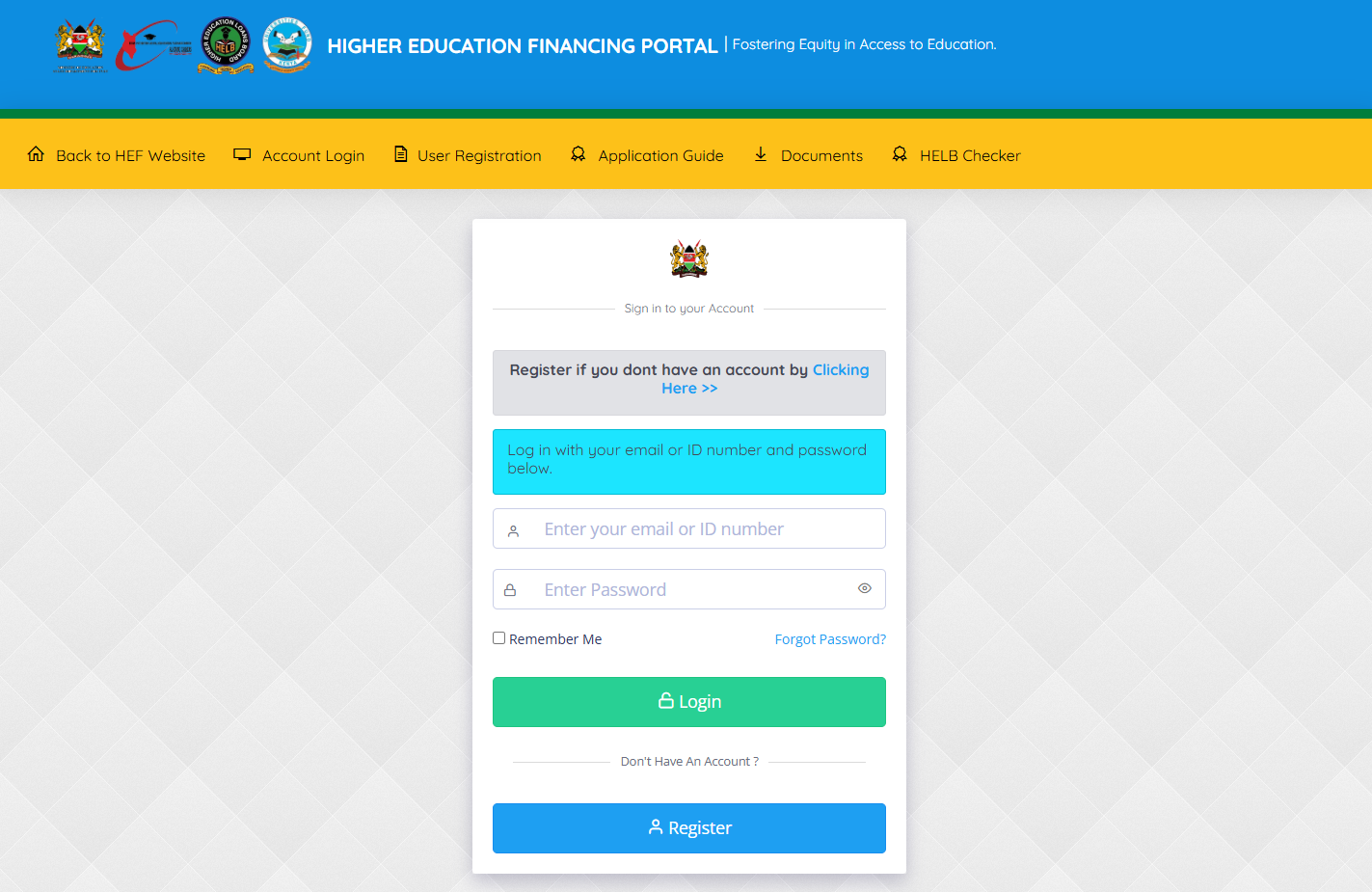
To be able to check and know your HELB Loan Batch Number online, the first thing that you need to do is to visit HEF Portal using https://portal.hef.co.ke/
- Step 2: Enter Email Address or ID Number
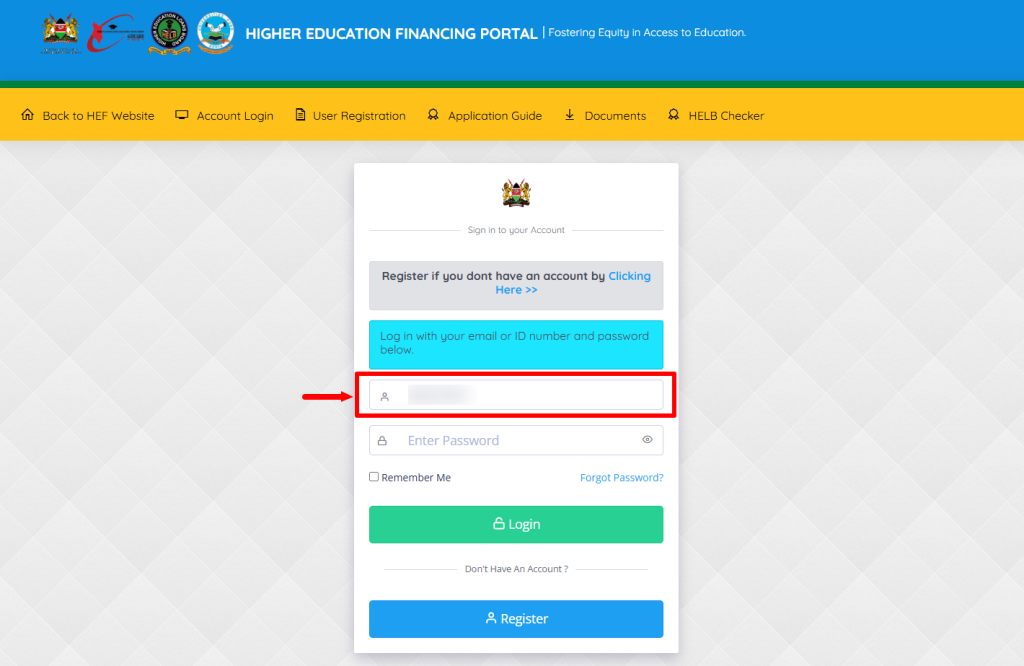
Once you are on HEF Portal, proceed and enter email address or ID number that is linked to your HEF account.
- Step 3: Enter HEF Account Password
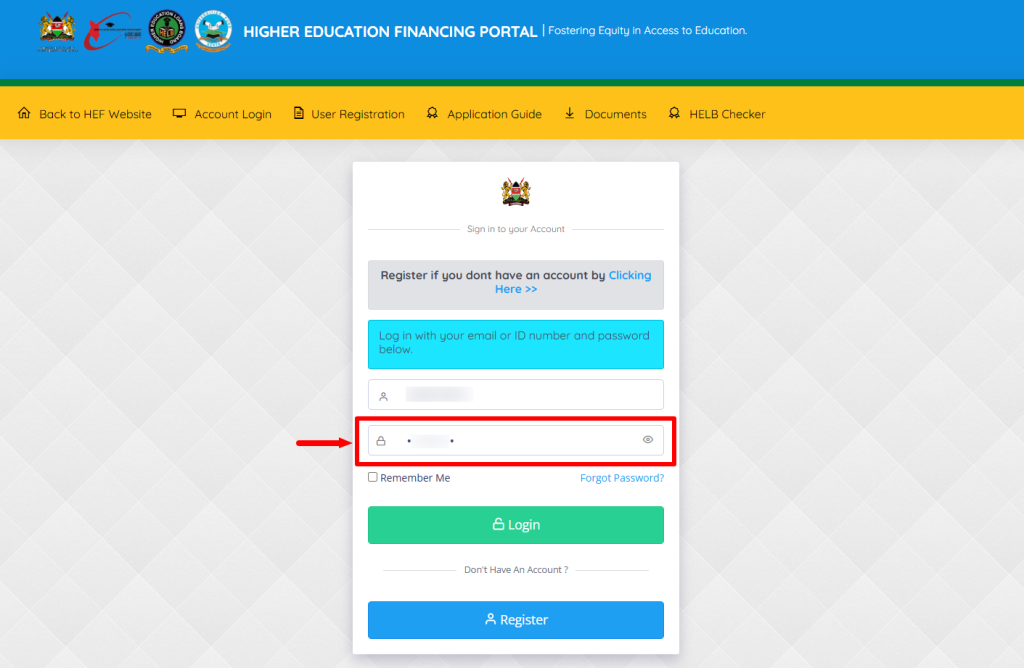
Next, enter the HEF Portal Account Password and proceed to the next step.
- Step 4: Click on Login
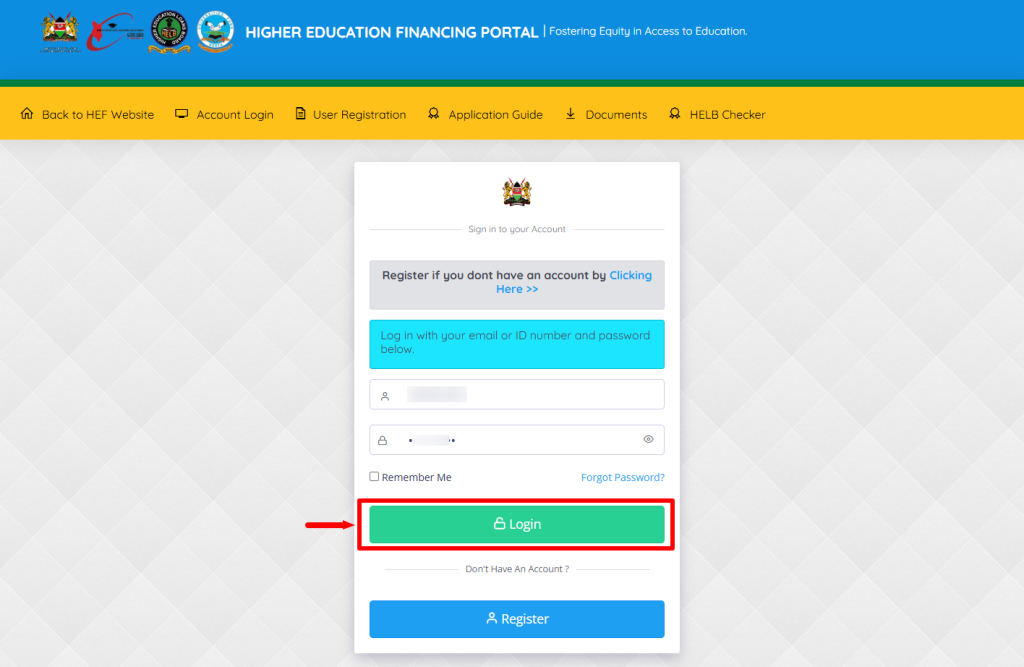
In this step, once you have entered your email address or ID number and HEF Portal account password, click on the “Login” button.
- Step 5: HEF Students Portal Dashboard
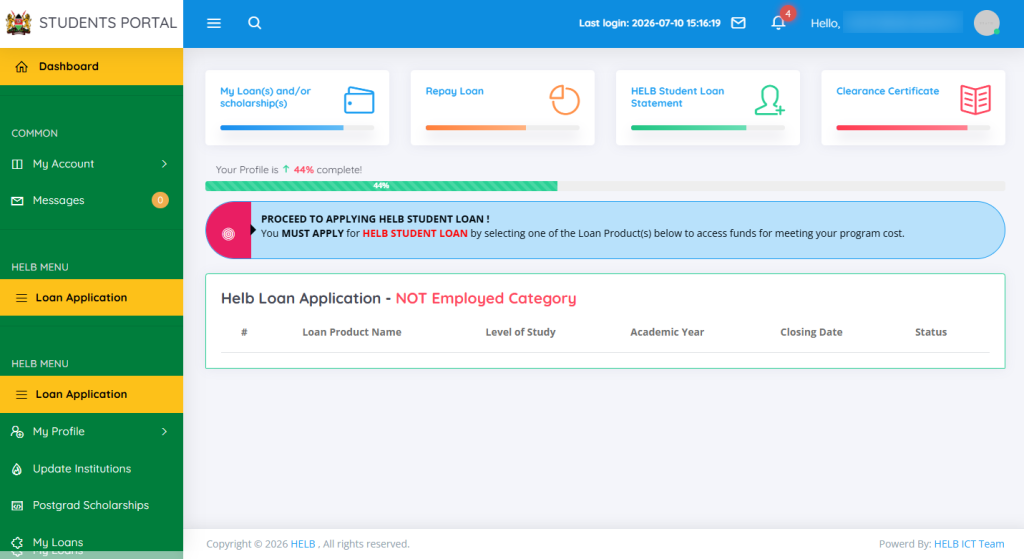
Next, you will be successfully logged into HEF Students Portal account and you can now start the process of checking your HELB Loan Batch Number online.
- Step 6: Click on My Loans
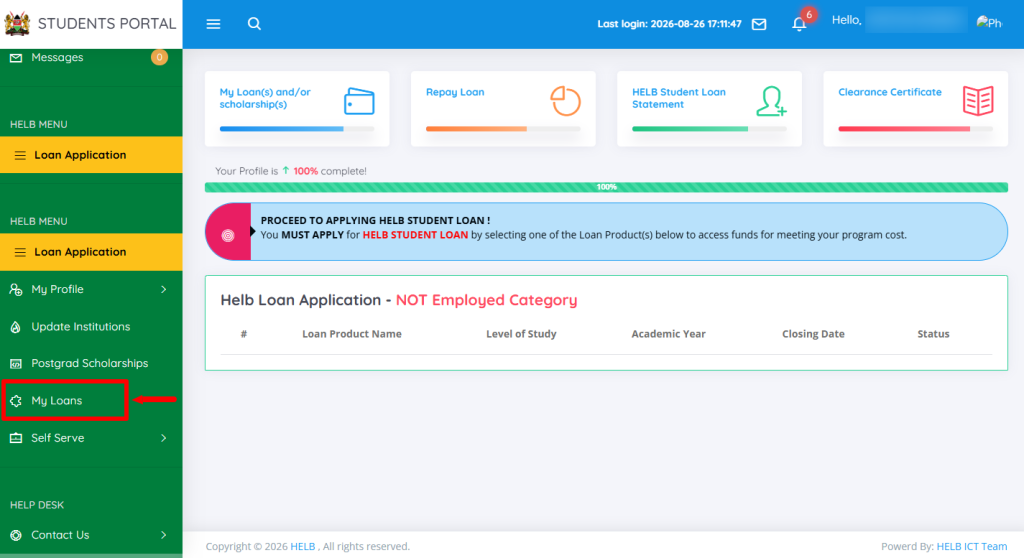
In this step, you need to click on “My Loans” option from the HEF Students Portal account dashboard.
- Step 7: View Details
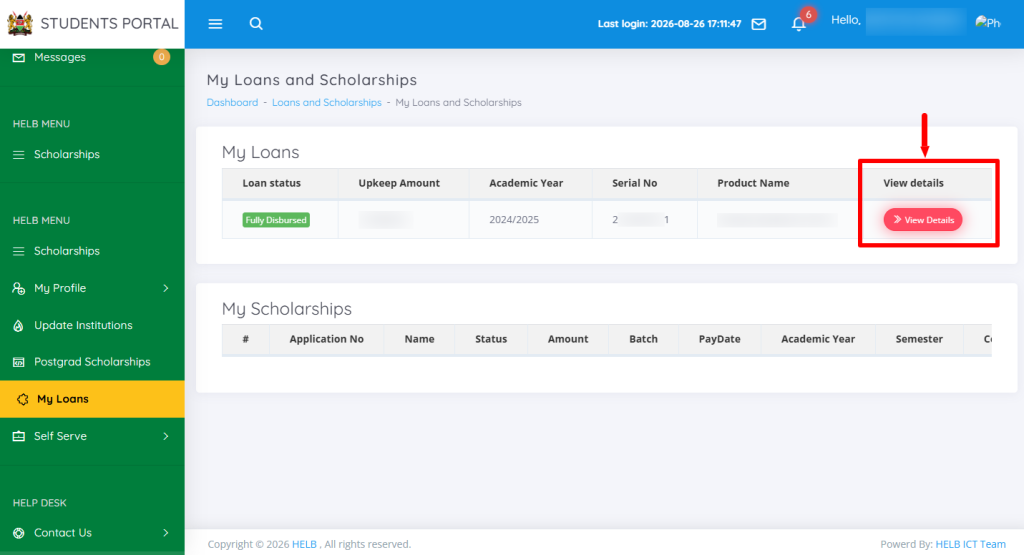
Next, click on “View Details” link so as to load the HELB Loans History section.
- Step 8: Click Loan History
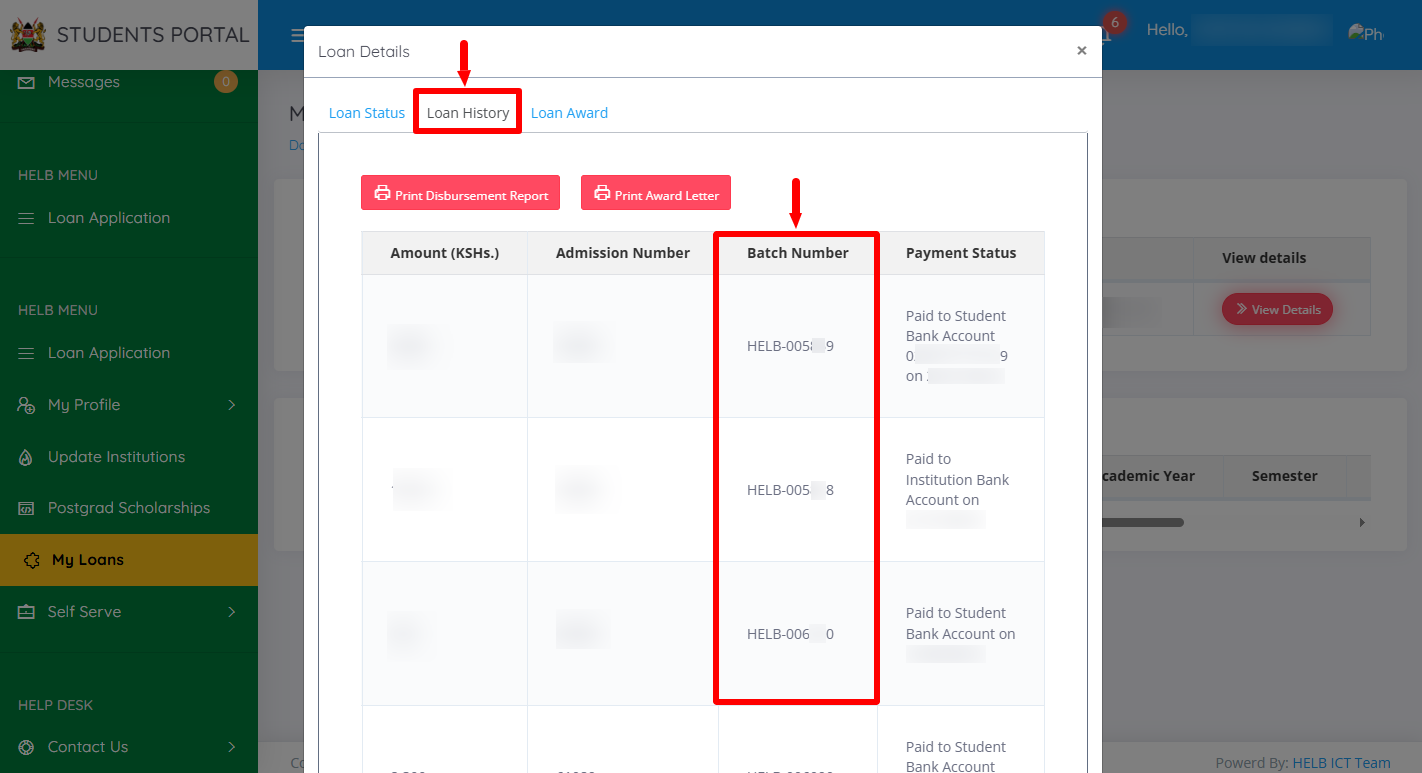
In this last step, click on “Loan History” to load the section that contains the “HELB Loan Batch Number” i.e the column containing the batch number. At this point, you will be able to check and view the Batch Number for HELB Loan and use the same number to track the status of HELB Loan online.
Overview: HELB Loan Batch Number Check
To check your HELB Loan Batch Number, start by visiting the HEF Portal and entering the Email Address or ID Number linked to your HEF account. Enter your HEF Account Password and click on Login to access the HEF Students Portal Dashboard. Once logged in, click on My Loans and then select View Details to access your loan information.
READ ALSO: How To Download HELB Loan Disbursement Report
Next, click on Loan History to view your HELB loan details and disbursement information. In the Loan History section, locate the column labelled Batch Number. The HELB Loan Batch Number assigned to your loan will be displayed in this column.